

The FTM 2024 25.0.2 update focuses on fixing things that don’t always work the way they should, especially syncing, reports, and a few everyday actions that tend to arise during regular use.
If you have installed Family Tree Maker 2024 for Windows and Mac and used itfor a while, you have likely seen some of these issues. Notes not syncing properly, reports needing small adjustments, or search results that didn’t quite match expectations in certain cases.
This update focuses on addressing these issues. Instead of adding features, it tightens what’s already there. You may not notice one big change right away, but over time, things feel more stable and predictable, particularly when working with larger or frequently updated trees.
This free update offers instant fixes based on user requests. It also introduces new contextual pie charts in the Connect Workspace.
Connect Workspace Statistics
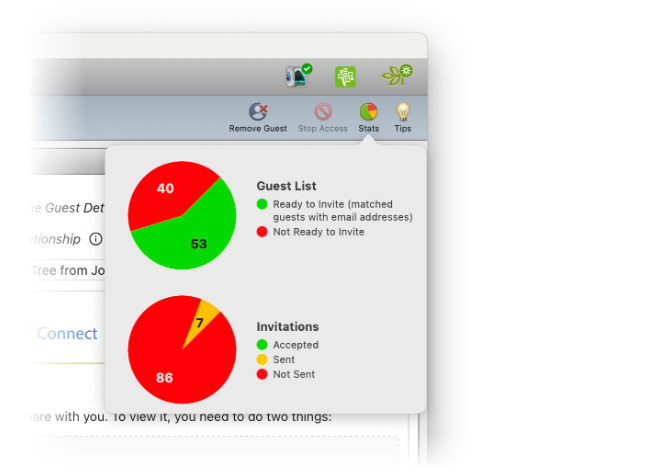
This is one of the few visible additions introduced in the update
Contextual Statistics Popup Window
A Stats button has been added to the Connect workspace. By clicking on the stats button on the toolbar, you can get the quick summary of stats pertaining to that tab.
Now you can easily check invitations sent for fact-checking, how many were accepted, and any Relative Hint™ responses received.
For users who collaborate often, the feature makes it easier to keep track of interactions without interrupting the workflow.
VERSION 25.0.2 – WINDOWS FIXES
None of the changes to the FTM 2024 are major, but taken together, they improve how the software behaves during day-to-day use.
In particular, syncing and reporting feel more consistent now, which are areas most users interact with regularly.
Ancestry Domain Matching
Search now follows the Ancestry region selected during setup (US, UK, Canada, etc.). Earlier, results could feel slightly off depending on the region, but that mismatch doesn’t seem to occur anymore.
Web Search Data Auto-fill
Auto-fill now works even if the Windows account name includes spaces. It’s a small fix, but it removes repeated manual input during searches.
Apostrophe Character Issue
Names with apostrophes no longer appear as odd character codes. Search results display normally again, which makes them easier to read and verify.
Save to Ancestry from Newspapers.com
Saving records directly from Newspapers.com to Ancestry is working again. This restores a step that some users had to work around earlier.
Ancestry Notes Syncing
Notes created in Ancestry now appear correctly in the new update for Family Tree Maker 2024. If you rely on notes to track context or decisions, this sync is one of the more useful fixes here.
Sync Error Improvements
Syncing feels more stable overall after the fix. Uploads and downloads go through with fewer interruptions, especially when working with larger trees or frequent updates.
Reporting Improvements
Several report-related issues have been resolved, and although each change is minor, they collectively contribute to the overall improvement.
• Short place names now appear correctly in the genealogy report, so formatting stays consistent.
• Source numbers in the Ahnentafel Report are properly linked, which makes it easier to trace where information comes from.
• Burial-related sources also show up without needing extra settings. Sources for burial facts are listed in the Descendant Report without needing to click “List non-vital facts separately.”
On the layout side, reports are cleaner. Extra blank lines have been reduced, notes don’t shift awkwardly to new pages, and formatting issues with newspaper-based sources have been corrected. Overall, less manual cleanup is needed after generating reports.
Usability Adjustments
A few everyday interactions feel smoother now.
Formatting shortcuts in Notes work even without selecting text first, which speeds things up slightly. Scrolling in Family View behaves normally again, so navigation feels more natural.
The Ancestors filter also returns complete results without needing manual tweaks.
For UK users, Ordnance Survey maps are available again in the Places workspace, restoring that missing context.
Stability and Performance
Some changes are less visible but still matter. Occasional crashes during tree operations no longer show up, and working with trees stored on network drives is more reliable.
Opening a tree after restarting the application is also quicker now, especially when it’s linked with Ancestry.
Even smaller details like media caption shortcuts and font consistency in Web Search have been corrected so things behave the way you would expect.
VERSION 25.0.2 – MAC FIXES
On the Mac side, most of the fixes deal with usability and consistency, especially for users on newer macOS versions.
Installation and Setup
Installation issues on macOS 26 have been addressed, so the software installs normally.
Buttons in the installer are also easier to see now, particularly on darker backgrounds.
Ancestry and Search
Search now aligns properly with the selected Ancestry region (UK, US, Canada, etc.).
Notes sync correctly between Ancestry and Family Tree Maker 2024 new update, which keeps research data consistent across platforms.
Text with apostrophes also displays as expected again, fixing earlier formatting issues.
Media Handling
Adding media is easier now. You can drag and drop files even if no media existed before. Earlier, the process didn’t always work and required a workaround.
Navigation and Interaction
Some small but noticeable improvements show up while navigating. Switching between tabs using the keyboard works as expected, and shortcuts behave more consistently even when focus shifts between panels.
The description field is also included properly during navigation, so it no longer gets skipped while entering data.
TreeVault and Account Actions
Replacing antenna trees for TreeVault accounts with media subscriptions works fine now.
Color-Coding Drop-down in People Workspace
Corrected the behavior on macOS 26 where the Color Coding drop-down would close immediately upon clicking, making it unusable.
FamilySearch login button
The FamilySearch login button is responsive again, so access works normally; earlier it was unresponsive.
Corrupted Icons in Person Pane
Icons in the Person pane display correctly now, and toolbar buttons respond across their full clickable area, not just in specific spots.
Take Assistance from Family Tree Makers Support
If you still have a query about the new update, you can connect with an agent at Family Tree Makers Support through phone.
They offer both phone and chat support, and if necessary, they can resolve your issues remotely. In remote support, a specialist will establish a connection and gain remote access to your computer.
They carry out troubleshooting and resolve all issues you are facing. So, whether it is about FTM 2024 assistance or the 25.0.2 update, they can help you with everything; all you need is a functional internet connection.
Final Thoughts
If you have installed Family Tree Maker 2024 for Windows and Mac, you know the FTM 2024 25.0.2 update doesn’t add new features, and that’s obvious.
What it does instead is resolve the smaller issues that tend to show up during regular use, such as syncing gaps, report inconsistencies, and navigation quirks that weren’t always smooth.
You might not notice a big change immediately, but with regular use, you will notice a difference. Things behave more consistently, and you don’t run into the same interruptions as often.
Frequently Asked Questions
1. Is the update free for existing users?
Answer: The improvements were made based on the user feedback, so the update is absolutely free.
2. Does this update include new features?
Answer: No major features have been added in the FTM 2024 25.0.2 update, as the focus is on fixes and stability improvements.
3. Will this update improve Ancestry syncing?
Answer: Yes, it will improve Ancestry syncing because it will be more reliable now especially for notes and frequent updates.
4. Is this update important for Mac users?
Answer: Yes, it is important, particularly for users on newer macOS versions where some issues were more noticeable earlier.
5. Should I back up my tree before updating?
Answer: It’s recommended to take a backup before installing any update, just to be safe.
6. Will reports improve after this update?
Answer: Yes, reports are cleaner and more consistent, with fewer formatting issues.
Disclaimer:
Family Tree Maker 2024 is available for Windows and macOS only. It does not support Linux-based operating systems.